Usage stats
TL;DR
| What changed | What it means |
|---|---|
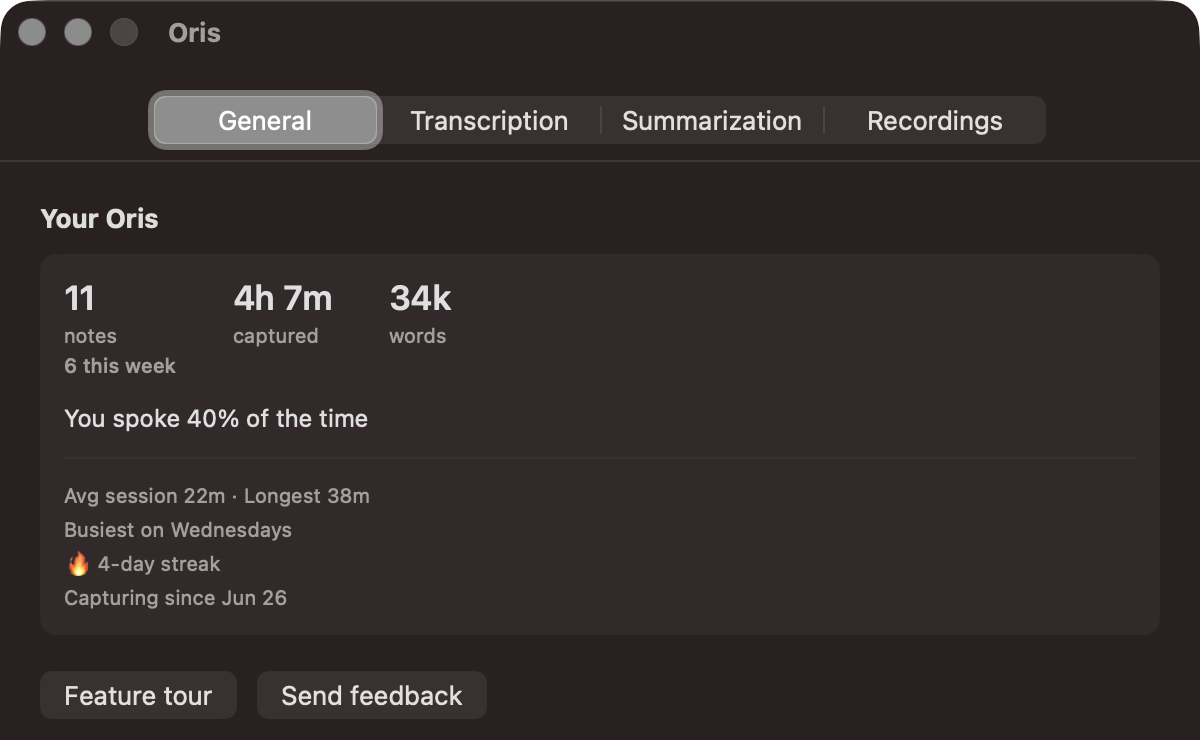
| Your Oris stats card | The General tab shows notes recorded, time captured, words, session lengths and your busiest day. |
| Talk ratio | The card shows the percentage of the time you spoke in your recordings. |
| Stats computed on your Mac | Oris computes every number on your Mac and sends none of it anywhere. |
This build adds a small card to the app’s General tab called Your Oris. It’s a handful of stats about how you’ve been using it: notes recorded, time captured, words, your average and longest sessions, the day of the week you record most. Nothing to do, nothing to fix. Just numbers to glance at.
I built it because the data was already sitting there, and some of it is genuinely fun to look at.
The stat I’m most attached to
Oris records two audio tracks: your mic, and the system audio from whatever you’re in a call with. That’s how it separates “me” from “others” in a transcript. A side effect is that it knows, for any conversation, how much of it was you talking versus everyone else.
So the card can tell you something most tools simply can’t: you spoke 40% of the time. Mostly listening.
That number is impossible to fake from a single mixed recording, and it’s impossible to get without doing the two-track capture in the first place. It comes out for free, and it’s quietly revealing. You find out whether you actually run the meetings you think you run.
It’s all local
Every number on that card is computed on your Mac from your own recordings. None of it is sent anywhere, and Oris doesn’t assemble it on a server. The audio-stays-on-your-Mac promise carries straight through: the stats are derived from the same local files, on the same machine.
There’s no “time saved” figure on the card, and there won’t be. I could put up a number claiming Oris saved you four hours of typing this month, but I’d be inventing it, so I’m not going to. The card only shows things it can actually count.
A couple of honest caveats
The stats start fresh from this release. They don’t reach back through recordings you made before it shipped — the card grows from here. Give it a week or two of real use before the talk-ratio and the busiest-day patterns mean much.
There’s also a streak on the card, current and best. It’s there because it’s interesting, not because I want you to protect it. Oris will never tell you to keep it up or warn you that you’re about to break it. Record when you have something worth recording. The number is just keeping score for its own amusement.
Open the app, go to General, and have a look. It’s a quiet little window into how you actually work.