Settings & data
Audio retention
updated
How long Oris keeps the audio behind a note, and the two settings on the Recordings section that decide it.
Meeting audio adds up, so Oris clears out old recordings on its own. Settings → Recordings → Audio has one row, Keep audio for … days, that sets how long a recording is kept, defaulting to 90. Set it to 0 and Oris stops clearing anything out on its own, leaving deletion as something you do deliberately from a row in the history. When a recording ages out, its audio and the working files that go with it are removed together. Lower the number past the age of recordings you still have and Oris asks first, naming how many recordings (and how much space) the shorter window makes eligible and when they go, so nothing is marked for deletion by a slip of the keyboard; raising it, or setting 0, never asks.
Your notes are never touched. A note that links to the audio keeps its link, which Obsidian then shows as a broken one, so it’s obvious the source recording is gone rather than misplaced.
Cleanup happens when you start a new recording rather than on a schedule, so a long stretch away from Oris won’t churn through old files in the background.
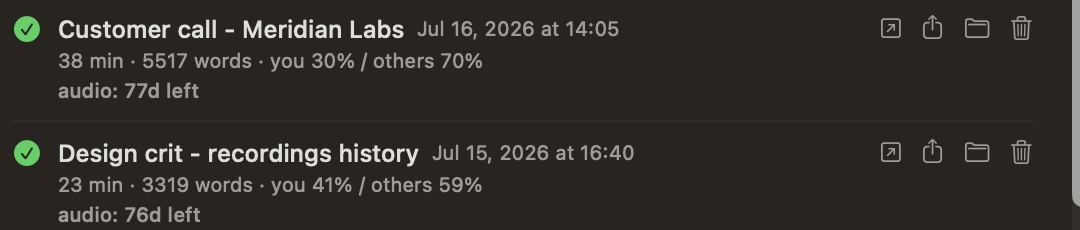
The app’s recordings history shows where each recording stands. While retention is on, every row carries a countdown (“audio: 82d left”), which reads “audio pruned” once the file has gone. Set retention to 0 and no countdown appears at all, because nothing is going anywhere. Because the sweep only runs at the start of a recording, “0d left” means eligible rather than deleted: the file goes the next time you record. A recording’s row also offers Delete audio… in its … menu (or on a right-click) for clearing one out immediately. That one is worth reading the confirmation on, because deleting a recording’s audio also gives up the ability to retry its summary.
Quick note audio
The same setting bounds Quick Note audio, in the one case where any exists. A quick note that lands is delivered as text and its audio is deleted on the spot, so there is normally nothing to retain. What can linger is the audio Oris deliberately keeps when a capture goes wrong — the “audio kept” messages, and a capture where nothing was heard — so you can find out what happened. When retention is set above 0, those files age out under the same Audio retention window and are swept when your next quick-note capture starts, so the sweep never delays the capture itself. At 0, Oris skips that sweep entirely, exactly like the main recording sweep above — though this kept audio lives where macOS clears temporary files on its own schedule, so “keep everything” is a promise about what Oris does, not what macOS may.
One caveat: this kept audio lives in a temporary area that macOS manages, and macOS clears temporary files on its own schedule regardless of this setting, including at 0. The setting adds Oris’s own bound on top of the system’s; it doesn’t extend how long the system keeps them.
The controls
The tab opens with Recent recordings, your last five recordings and imports as compact rows showing note name, date, mini-stats and status, plus a See all recordings… button that opens the full history in a sheet. Rows carry actions to open or share the landed note, reveal the audio, retry a failed summary, or delete the audio early. See Recordings history. That list is display rather than settings, and nothing in it is written back to your configuration. The settings sit below a divider:
- Audio — a Keep audio for … days row controlling how long raw recordings are kept before Oris cleans them up. The default is 90 days, and 0 keeps everything.
- Auto-stop on silence — a Stop recording after a stretch of silence switch, a minutes value, and a Warn me … seconds before it stops field. When both the mic and system-audio tracks go quiet for that long, the recording stops itself and transcription runs normally. The default is five minutes with a sixty-second warning, and changes apply to your next recording. See stopping itself.