Your notes
What lands in your note
updated
The summary block, the collapsed transcript, the footer naming what wrote it — and how the two sides of the call are told apart.
When a recording finishes, Oris replaces the pending marker in your note with two things: a summary block carrying a TL;DR, action items, decisions, open questions, topics discussed and notable quotes, and a full transcript that renders as click-to-expand so it stays out of your way until you want it. Sections with nothing in them are left out rather than printed empty. Below both, a small footer (_Summarized by **provider** (model)_) records which backend wrote the summary, so you can always tell what Auto picked.
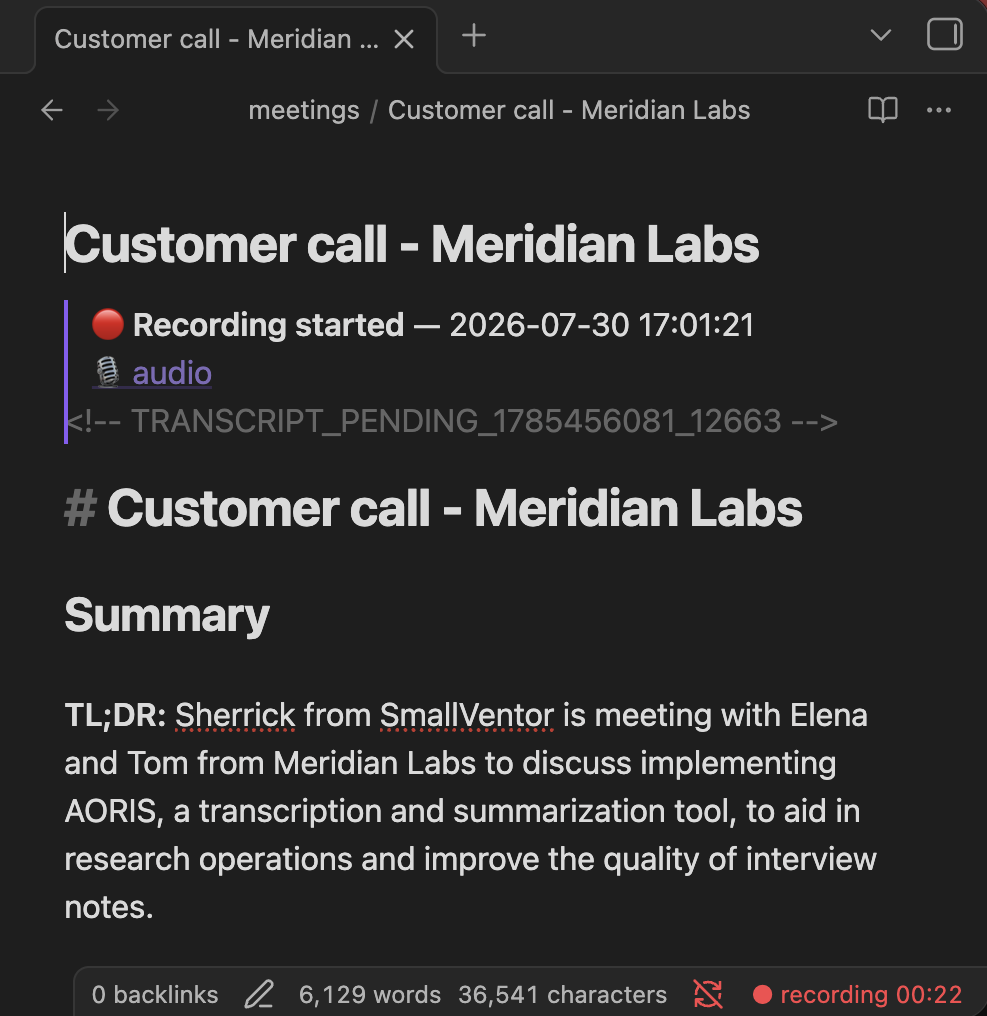
Those sections are the standard shape, and it’s a shape you can change: note templates let a summary ask for your own headings, and structured notes turn Decisions and Action Items into extracted items that each quote the transcript line backing them. Both are part of Oris Pro; without them, every note whose summary lands gets the standard shape above.
Turn off Settings → Summaries → Enable summaries and the transcript still lands, as a plain section with nothing above it. See turning summaries off.
If summaries are on but the summary fails, because of a bad API key, an unreachable provider, or a model that returned nothing, the transcript lands exactly as it would have. In place of the summary you get a visible ⚠️ block naming the provider, what went wrong, and how to retry. Oris remembers the failure, so the retry command and the app’s Recordings history can both offer you a one-click retry later. See when a summary fails.
Who said what
Because Oris records your microphone and your Mac’s system audio as two separate tracks, the transcript comes back already split by side, with no diarization setup to configure. Anything captured through the mic is tagged me, and anything captured from system audio, whether that’s Zoom, Teams, a browser tab or a phone call played through the Mac, is tagged others. Consecutive segments from the same side get grouped under one block, with timestamps in _[mm:ss]_ format.
One limitation is worth knowing: every remote participant pools under others. Separating remote speakers from each other is a v2 feature rather than something the product does today. If you need to attribute a specific quote to a specific person, the timestamp plus your own memory is the workflow.
Pro · coming Telling the people on the other side of a call apart is coming to Oris Pro.
How it works underneath
Speaker bleed cleanup, when you record on speakers
If you take a call with the audio coming out of your laptop speakers rather than headphones, your microphone hears the other side as well as you do. Left alone, that lands the same sentence twice in the transcript: once cleanly on the others track, and once as a muddier echo on the me track, which reads as though you repeated everyone.
Two passes clean it up. The first is a text-similarity check that compares what the two tracks heard around the same moment and drops the near-duplicate from your track. The second is an independent check of whether your microphone actually heard speech at that point, which catches the leftovers the first pass is too cautious to remove.
Both run automatically on every recording. Headphones sidestep the problem entirely, because the mic never hears the far side in the first place.
The silence-hallucination filter
Whisper is known to invent text on silent audio, usually short stock phrases like “Thank you.”, “Thanks for watching.”, “All right.” or “Bye.” Because Oris transcribes your microphone and the call’s audio separately, a stretch where one side says nothing is a stretch where those phantoms would otherwise show up attributed to that side.
Oris catches them before they reach your note, using a curated list of the phrases Whisper reaches for alongside signals about whether there was any real speech in that stretch at all. The bar is deliberately high for anything conversational: short fillers like “okay”, “yeah”, “thank you” or “bye” only count as a phantom when they are the whole segment, so a real sentence that merely contains one of those words (“Okay, so let’s move the launch to Friday…”) is kept however long it runs. The stock video sign-offs (“thanks for watching”, “subscribe to my channel”) are treated more aggressively and matched anywhere in a segment, on the grounds that they are far likelier to be an artifact than something anyone said. If you spend your meetings talking about video scripts, that is the one case where a real line could go, and the recording is what you would check it against, for as long as you still have it: see Audio retention, which clears recordings after 90 days by default.
The filter runs on each side before the two are woven together, so the transcript you read is already clean.